Recommendations6 min read
How recommendations keep shoppers browsing your store
By the BasketBooster team
The short answer
Most visitors land on a single product page and leave from it. Recommendation blocks give that page a next step: similar products if this one is not quite right, items bought together with it, picks based on the shopper’s own history, and what is trending now. When the suggestions are relevant, shoppers view more products per visit and see more of the catalog.
The product page that leads nowhere
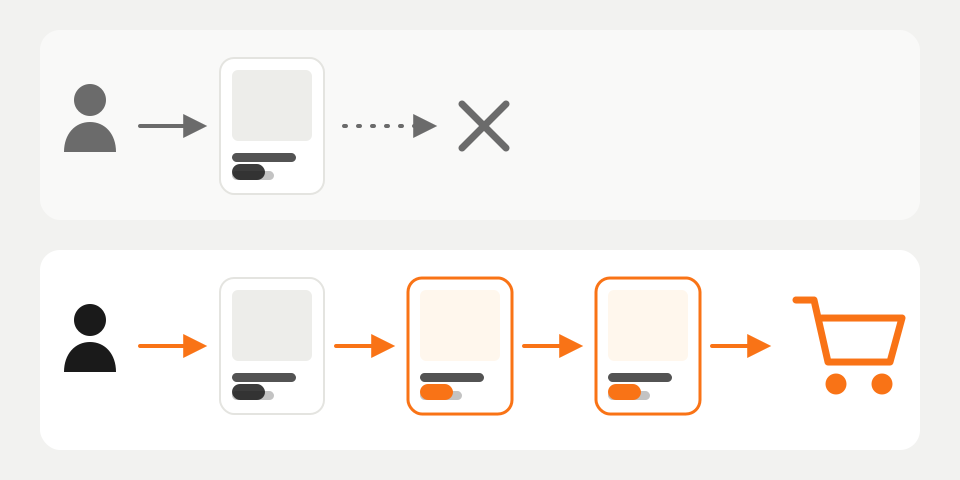
Open your analytics and look at where visits start. For most stores it is not the homepage. People click an ad, a Google result or a link someone posted, and they land on one product page.
Then a lot of them leave from that same page. The colour was wrong, the price was above what they had in mind, or they wanted the larger size and did not see it. Your store probably had something close to what they wanted two clicks away, and they never saw it.
That is a dead-end product page. It describes one product and offers nothing to do except buy or hit the back button. You paid for that visit, with ad money or with the work it took to rank, so a dead end is an expensive place for it to stop.
What product discovery means
Product discovery is a plain idea: a shopper should be able to get from the product they landed on to the product they want without going back to the menu and starting over. Menus and category pages do part of that job. Search does another part, for the shopper who already knows what to type.
Recommendations cover the shopper who does not know what to type, or cannot be bothered. A block under the product says “you could go here next”, and each kind of block means something different by that.
Four blocks, four different next steps
| Block | The question it answers | Where it fits |
|---|---|---|
| Similar products | “Is there one like this that suits me better?” | Product page |
| Bought together | “What do I need with it?” | Product page, cart |
| For you | “What else here is my kind of thing?” | Homepage, collections, empty cart |
| Trending | “What is everyone buying right now?” | Homepage, category pages |
Similar products save the visit when the first product is a near miss. Same kind of item, different price, colour or brand. The shopper moves sideways instead of out.
Bought together moves them forward. The camera gets its memory card, the pour-over brewer gets the beans. This is the block that grows the order, and it only works when the pairs come from real orders. A “related products” box built on tags will happily offer a second camera to someone who has just chosen one. Its cousin, “people who bought this also bought”, sends shoppers further into the catalog and carries some proof with it. We covered that side in recommendations as social proof.
For you blocks use the shopper’s own views and purchases. With them, the homepage stops being the same grid for everyone, and an empty cart page gets something to offer.
Trending products and bestsellers need to know nothing about the shopper, which makes them the fallback for everything else. They do better when you narrow them to a category. “Trending in garden tools” tells someone on a garden page more than the store-wide top ten does.
Relevance beats quantity
The common mistake is to treat the space under a product as shelf space to fill. You get four or five carousels on every page, most of them showing the same bestsellers. Shoppers scroll past it the way they scroll past banners.
A next step only works when it is connected to why the person came. Someone looking at a child’s raincoat might click on wellies or on a different raincoat. They are unlikely to click on your best-selling phone case, however well it sells.
One or two blocks that pass this test do more than five that fail it. You can still steer by pinning a product, hiding clearance or boosting a brand, as long as that sits on top of relevant suggestions and does not replace them.
First-time visitors and returning ones
A first-time visitor has no history, so nothing can be personal yet. That matters less than it sounds, because the product they are looking at is already a strong signal. Similar and bought-together blocks need only that. Personal picks start to build as the shopper browses.
A returning visitor is where “for you” earns its place. They open the homepage and see picks shaped by what they viewed and bought before, so they skip the part where they hunt for the category they were in last time.
Newer stores are not shut out. Bestsellers and trending work from day one. Bought-together pairs show up once your order history contains them, and when the system is unsure it falls back on proven sellers instead of guessing.
What to watch in your analytics
Four numbers tell you whether shoppers are moving through the store.
- Products viewed per visit. If the blocks work, this goes up, most visibly for visits that start on a product page.
- Clicks on recommendation blocks. Look at them per block and per page type. A block nobody clicks is either irrelevant or sitting too far down the page.
- Exits from product pages. This is the dead-end number. Compare before and after for the same traffic sources.
- Revenue from recommended items. Count the orders that contain something the shopper reached through a recommendation.
Read them together. More clicks with flat revenue usually means the suggestions are interesting to look at and are not what people buy. On order size, the one figure we will quote is our own: across stores running BasketBooster, average order value is up 18%. Results depend on your catalog and your traffic, so measure your own store and give it a few weeks before you judge. There is more on the money side in what product recommendations do for a store.
What recommendations cannot fix, and how to try them
Recommendations move people who are already willing to look. They do not rescue a page that loads slowly on a phone, because those visitors leave before any block appears. They do not make up for dark or blurry photos. And a product priced well above the competition stays overpriced whatever you put under it. Sort those out first.
If the basics are in decent shape, trying this costs little. BasketBooster recommendations come as four engines on every plan: bought together, also bought, cart-aware add-ons and personal picks, with bestsellers and trending available from day one. On Shopify you install the app. Elsewhere you paste one line of code.
For shoppers who do know what to type, search comes with the Growth plan and up on WooCommerce and custom stores. It is not on Shopify yet. The trial runs 30 days with no credit card, and the plans are on the pricing page. Put one block on your product pages, write down this week’s exits from product pages, and compare in a month.
Questions merchants ask
- Will recommendations work if my store has few orders?
- Yes, within limits. Bestsellers and trending products work from day one, and bought-together pairs appear as soon as your order history shows them. You can speed that up by uploading a CSV of past orders.
- Can I decide what gets recommended?
- Yes. You can pin a product, hide clearance items, exclude categories, or boost a brand, a colour or a whole category. Each rule takes effect the moment you set it.
- Does this work on Shopify?
- Yes. The Shopify app covers recommendations and demand forecasting, and you choose where the widgets go. Search is not available on Shopify yet; it works on WooCommerce and custom stores.
- How do I know the recommendations are working?
- Compare products viewed per visit and exits from product pages before and after you add the blocks, for the same traffic sources. Then check clicks per block and the revenue from recommended items. Give it a few weeks, since one good or bad week proves little.
TagsProduct discoveryPersonalizationConversion
See it on your own store
Every plan starts with a 30-day free trial. You don’t need a credit card.